AI for Real Estate Listings: 2026 Market Trends
Learn how to use AI for real estate listings to write better copy, improve visuals, respond faster, and stay compliant without losing your voice.
Learn how to use AI for real estate listings to write better copy, improve visuals, respond faster, and stay compliant without losing your voice.
AI for Real Estate Listings: A Practical Guide for Agents
It’s 8:00 PM. You’ve been in the car all day. You finally sit down to get a new listing live and you’re staring at the same blinking cursor you’ve stared at a thousand times.
You can only rewrite “open floor plan” so many ways.
This is where AI actually helps. Not in a “robots replace agents” way. In a “stop wasting your life on blank-page work” way. Used correctly, AI turns your listing workflow into editing instead of drafting. You move faster. Your marketing looks more consistent. You respond quicker when inquiries hit. You still make the decisions.
The catch is simple: AI is not a licensed agent. It doesn’t know your MLS rules. It doesn’t know Fair Housing nuance. It will confidently invent details if you let it. You’re still the adult in the room.
What AI is good for in a listing (and what it isn’t)
AI is great at turning facts into clean language and turning one piece of content into ten formats. It’s also good at giving you variations: luxury tone, starter-home tone, short MLS version, long website version, social captions, email blurbs.
AI is not a pricing oracle. It can help you analyze patterns, but it can’t replace your CMA and local judgment.
AI is not a truth machine. If you feed it vague inputs, it will fill in the blanks. Sometimes those blanks are wrong. That’s on you.
If you keep those three truths in mind, AI becomes a useful assistant instead of a liability.
The fastest win: listing descriptions that don’t sound generic
Most agents try AI once, hate the output, and decide it’s overrated. The reason is always the same. They prompt it like this:
“Write a listing description for a house.”
Of course it sounds like junk. You didn’t give it anything real.
The quality of the draft depends on the quality of the inputs. Garbage in, garbage out.
A better approach is to feed it:
- the verified basics (beds/baths/sqft/lot)
- the top upgrades (new roof, new HVAC, renovated kitchen)
- the best lifestyle hooks (views, patio, walk to downtown, garage parking)
- the “buyer story” (who will love this home and why) — but keep that story about features, not people
Then you edit the draft like you would a junior assistant’s work. Cut the fluff. Add local specifics. Make it sound like you.
A prompt that actually works
Use this as your default and tweak it per listing:
Write a listing description under 900 words for a home with these verified features: [paste features].
Tone: [modern / warm / luxury / practical].
Include the neighborhood name, property type, bed/bath, and the top 4 features in the first two sentences.
Avoid clichés like “won’t last,” “hidden gem,” and “charming.”
Do not invent features. If something isn’t listed, don’t mention it.
Avoid Fair Housing risk language that describes who should live here.
You’ll get a usable draft. Then you make it yours.
AI for visuals: staging, enhancement, and floor plans
Buyers don’t read first. They scroll first. So visuals are where AI can make the quickest impact.
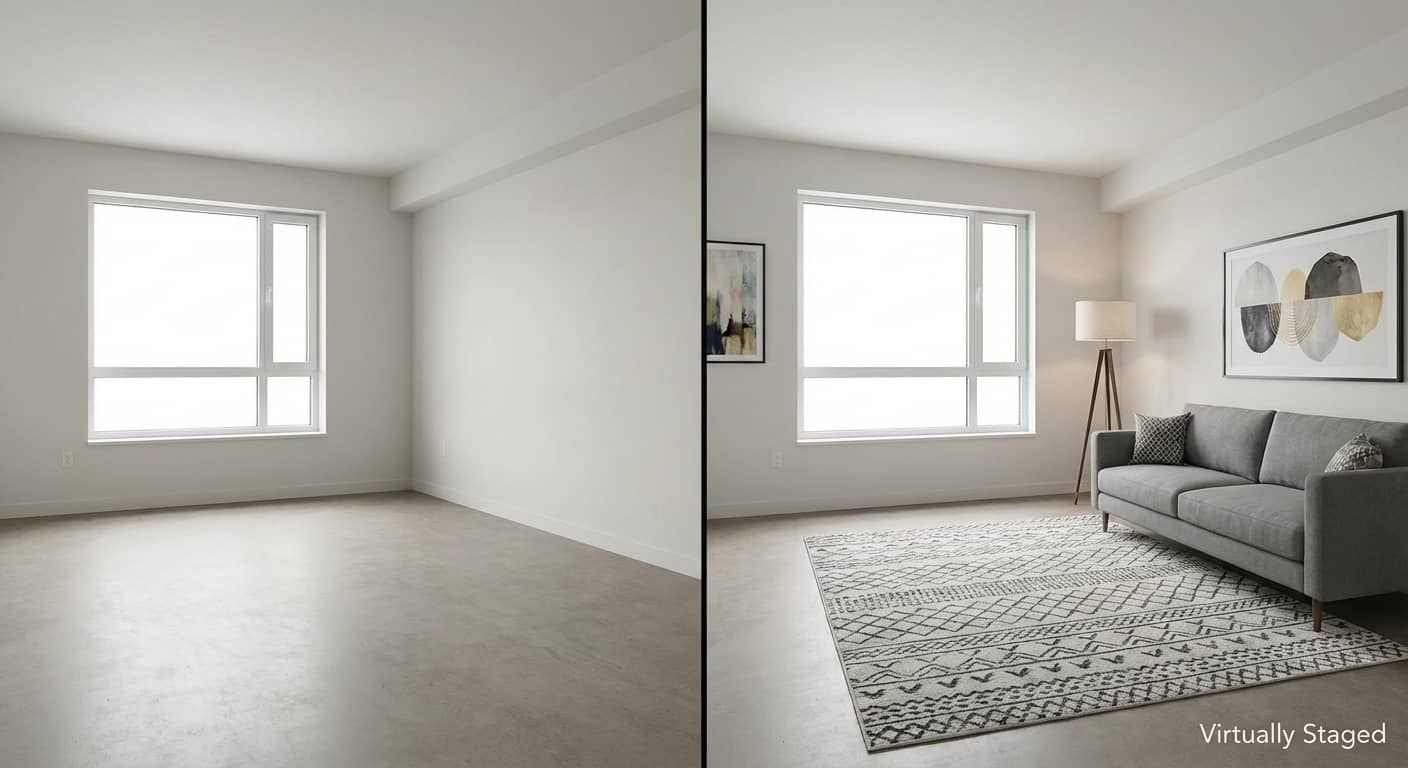
Virtual staging is the obvious use case. Empty rooms photograph cold. AI staging can help buyers picture scale and function. It works best when the furniture style matches the home and the photo quality is already strong.
Photo enhancement is helpful too, but this is where agents get sloppy. Brightening a dark interior photo is one thing. Editing a home into something it isn’t is another.
AI can also speed up floor plan creation if you use tools that generate plans from a walkthrough or a scan. Those can be a strong value-add, especially in markets where buyers are picky and online research is heavy.
One rule that keeps you out of trouble: if you altered the image, disclose it. Keep it simple. “Virtually staged” or “digitally enhanced.”
Where AI really earns its keep: response speed
Listings don’t just need better marketing. They need faster response.
A buyer inquiry at 9:30 PM is still a buyer inquiry. If your response comes the next morning, you’re already behind. AI can help here in a way that actually matters: drafting quick, useful replies and keeping the conversation moving until you step in.
This is especially effective when AI is tied into your CRM or your lead capture workflow. A buyer requests info. The system responds with the floor plan, disclosures, a tour link, and a simple question about timeline. Then you wake up to a warmer lead, not a dead one.
The goal is not to automate relationships. It’s to prevent good leads from cooling off while you’re sleeping.
Pricing: don’t oversell what AI can do
AI can analyze market data and pull patterns faster than you can. It can summarize trends, compare similar properties, and help you generate talking points for your CMA.
But don’t tell sellers AI “picked the price.” That’s a credibility killer.
Your best use of AI in pricing is as a prep tool. Have it help you:
- summarize comp differences in plain English
- explain pricing brackets like a buyer would see them
- create a clean net sheet explanation for the seller
Then you apply your local judgment and deliver the advice like a pro.
The risk zone: Fair Housing, hallucinations, and MLS trouble
This is the part you can’t ignore.
AI will suggest phrases that sound normal to the internet but create risk in real estate. Anything that implies who should live there can be a problem. “Perfect for families” is the classic one. “Great for young professionals” is another. Even “safe neighborhood” can get you into muddy territory.
Your safe rule is boring and effective: describe the property and objective location benefits. Not the buyer.
The other risk is hallucinations. AI will confidently invent a “sparkling pool” if you don’t tell it the home doesn’t have one. It will assume granite when you said “stone.” It will sprinkle in “new appliances” because it sounds good.
That’s why you do a truth check every time. If you can’t verify it, delete it.
And don’t forget MLS rules. Some MLS systems have restrictions on certain phrases or claims. Some frown on “priced to sell” or “motivated seller.” AI doesn’t know your local rules. You do.
A simple AI listing workflow you can run on every listing
This isn’t meant to be complicated. The agents who win with AI keep it boring.
Start with your raw facts. Get them right. Then use AI to draft quickly. Then you verify and polish.
Here’s the only checklist you need:
- Gather verified features, measurements, HOA details, and upgrade list
- Generate or refine visuals (only where helpful), and disclose edits
- Draft the description with a clear prompt and a character limit
- Do a truth check line-by-line and remove anything unverifiable or risky
- Upload to MLS: paste your optimized description and media into the MLS, double-checking that every detail matches the home
- Prep fast responses for inquiries and set a same-day follow-up plan
If you do that consistently, AI becomes a quiet advantage instead of a shiny distraction.
FAQ
Can AI write Fair Housing compliant listing descriptions?
AI can produce compliant language, but it can’t guarantee compliance because it doesn’t understand your local enforcement climate or the nuance of what your MLS flags. It will often default to phrases that describe the “ideal buyer,” which is where problems start. The safest workflow is to have AI draft the structure and feature-focused language, then you review every sentence with one simple filter: does this describe the home and objective amenities, or does it describe the people who should live there? If it’s about people, remove it.
Do I need to disclose AI virtual staging or photo enhancement?
In most cases, yes—and even when it’s not strictly required, it’s still best practice because it protects trust. If you virtually stage a room, label it. If you digitally enhance a photo beyond basic correction, label it. The goal is not to scare buyers; it’s to avoid misleading them. A simple watermark (“Virtually Staged”) or a caption note works, and it keeps you out of awkward conversations later when a buyer shows up expecting furniture that isn’t there.
What’s the best way to use AI for listing descriptions without sounding generic?
Treat AI like a draft assistant, not a writer. Give it real inputs—specific upgrades, materials, views, outdoor features, and neighborhood anchors—then tell it exactly what to do: include the key facts early, avoid clichés, and stay within your MLS character limit. After it drafts, you edit for tone and accuracy. The final version should sound like you: short, clear, feature-led. If it reads like a brochure, cut it down and add one or two concrete details only a human would include.
Can AI replace a professional real estate photographer?
No. AI can improve what you already captured, but it can’t create strong composition, angles, and lighting from nothing. Great photos start with great capture. Where AI helps is polishing: correcting lighting, staging empty rooms, and creating supporting assets like floor plans. If you want better listing performance, the best combo is still professional photography plus smart enhancements where appropriate.
Does AI help listings rank better on Zillow and Google?
It can, but not because AI is magical. It helps because it makes it easier to include the words buyers actually search for and to write cleaner, more structured descriptions. Zillow and portals rely heavily on data fields and filters, but the headline and description still influence clicks and buyer understanding. Google is more text-sensitive, especially on your own website pages. If AI helps you write clearer copy with real features up front, that usually improves visibility and engagement across channels.
How should agents avoid AI “hallucinations” in listings?
Assume AI will invent details unless you prevent it. Feed AI only verified facts, and explicitly tell it not to add features that aren’t listed. Then do a truth check: read the output and confirm every claim against the seller’s upgrade list, your notes, and the property itself. If you can’t verify a detail—age of roof, type of counters, “new appliances,” anything—either confirm it or delete it. Accuracy is your responsibility, and one false feature can create real liability.