( Before the Listing · Home value report · 5 versions )
The home value report
One big number for the whole town, one address box, one question. Then a full report that reads like a stock page: the home’s value, the homes like it that sold, didn’t sell, are getting attention and are sitting, and one ask: name your price.
Copy this into Claude, fill in the blanks, and you get your own version. It is the same brief that built this one.
( The prompt )
You are a senior designer, a front-end engineer and a data-minded listing agent. Build me a home value page for one town that does the first listing conversation for me. The owner gives me their street and one tap, and gets a report better than any value estimate they have seen. It has to be great on a phone.

THE DATA
- My MLS export for the town for the last 6 months, every status: sold, for sale, under contract, expired, canceled, withdrawn: [your file]
- How many homes are in the town: [Census count], and the typical home value now and 10 years ago: [Zillow Home Value Index]
- My name, my brokerage and how I want to be reached: [you]

THE LANDING PAGE (one sans typeface, navy and off-white, one accent color, motion that starts when a section is on screen)
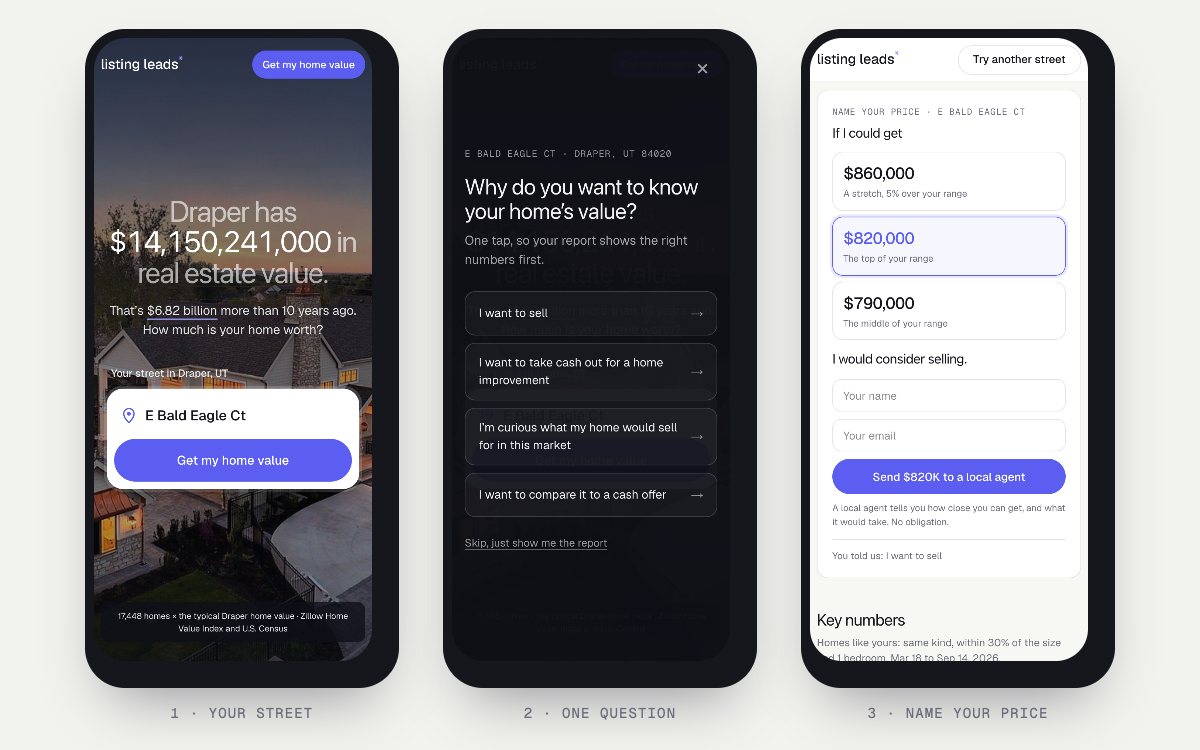
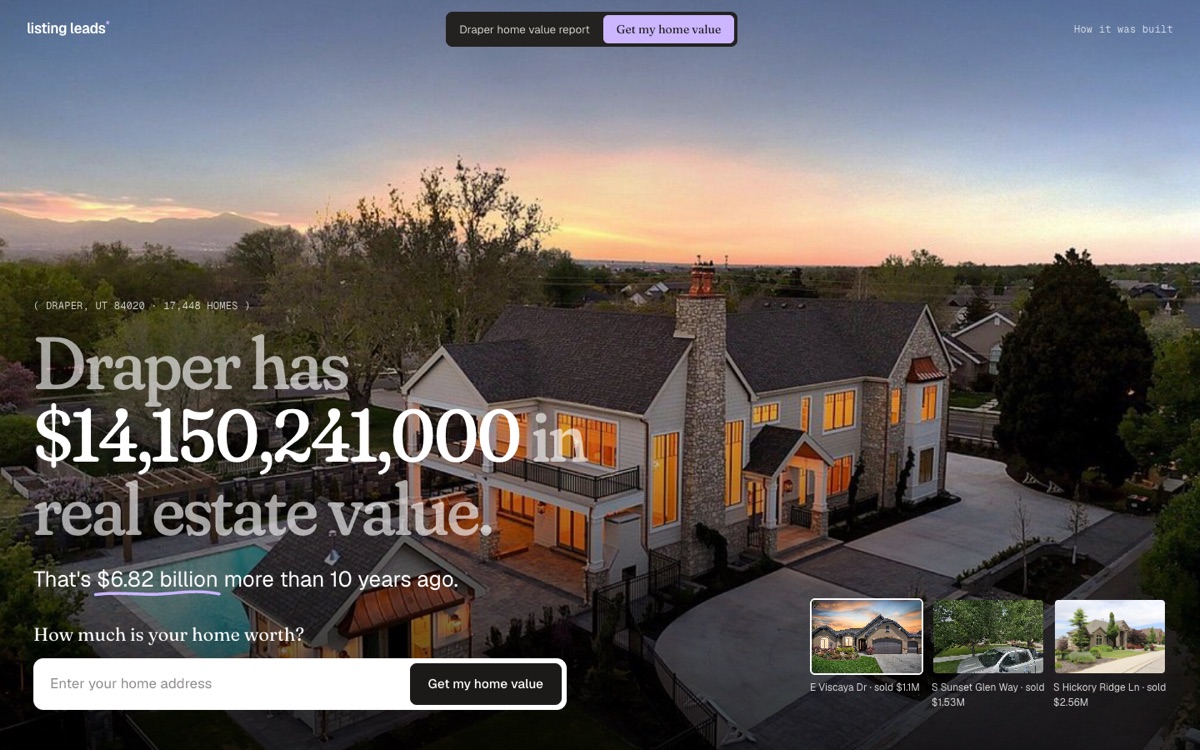
- A full-screen photo of a real home that sold in town. One big line: "[Town] has [homes times typical value] in real estate value." Count the number up. Under it: "That's [the 10-year gain] more than 10 years ago. How much is your home worth?"
- One big, solid address box with a pin icon and street suggestions, already filled in with a real street so one tap works. Nothing else to fill in.
- The town as a stock: a line chart of the total value that draws itself in, with 1Y, 5Y and 10Y buttons.
- The report window zooms up as you scroll, then a short list of the four parts with a live panel beside it that changes every few seconds.
- Three lesson cards with small moving charts, and a closing address box.

ONE QUESTION, BEFORE THE REPORT
- Full screen, one tap, and never a gate: "Why do you want to know your home's value?"
- I want to sell. I want to take cash out for a home improvement. I'm curious what my home would sell for in this market. I want to compare it to a cash offer.
- A quiet "Skip, just show me the report" link.

THE REPORT (like a stock page)
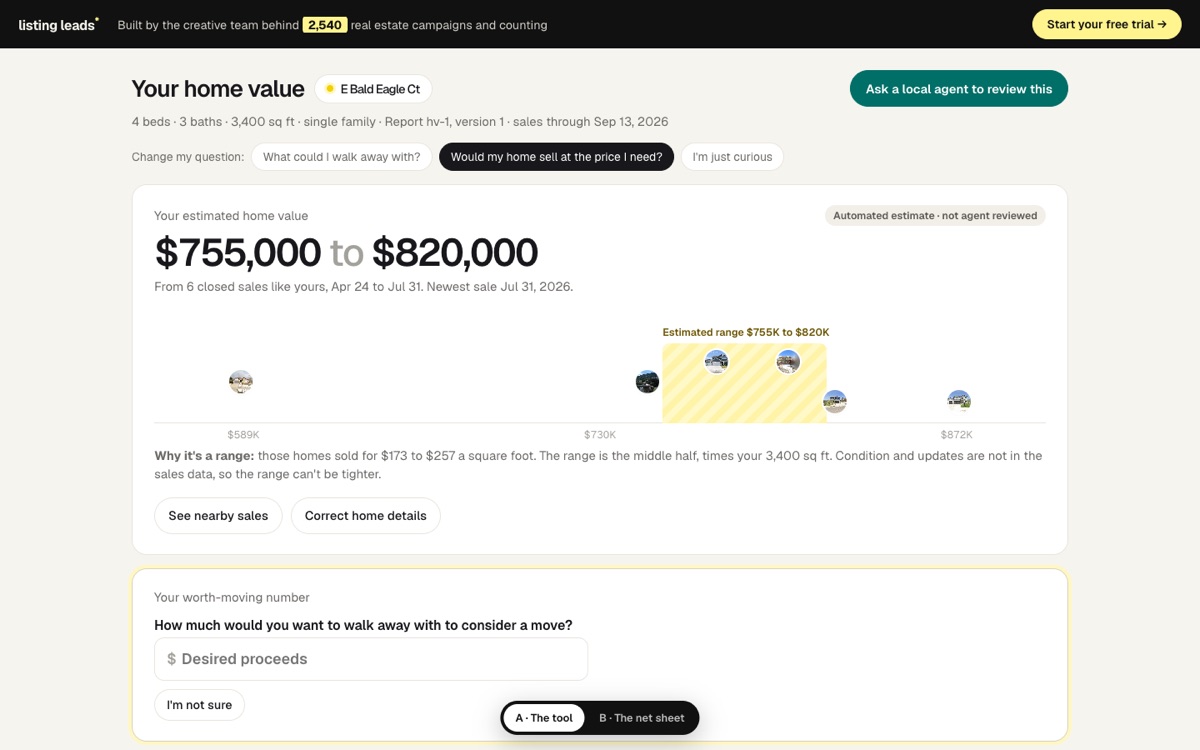
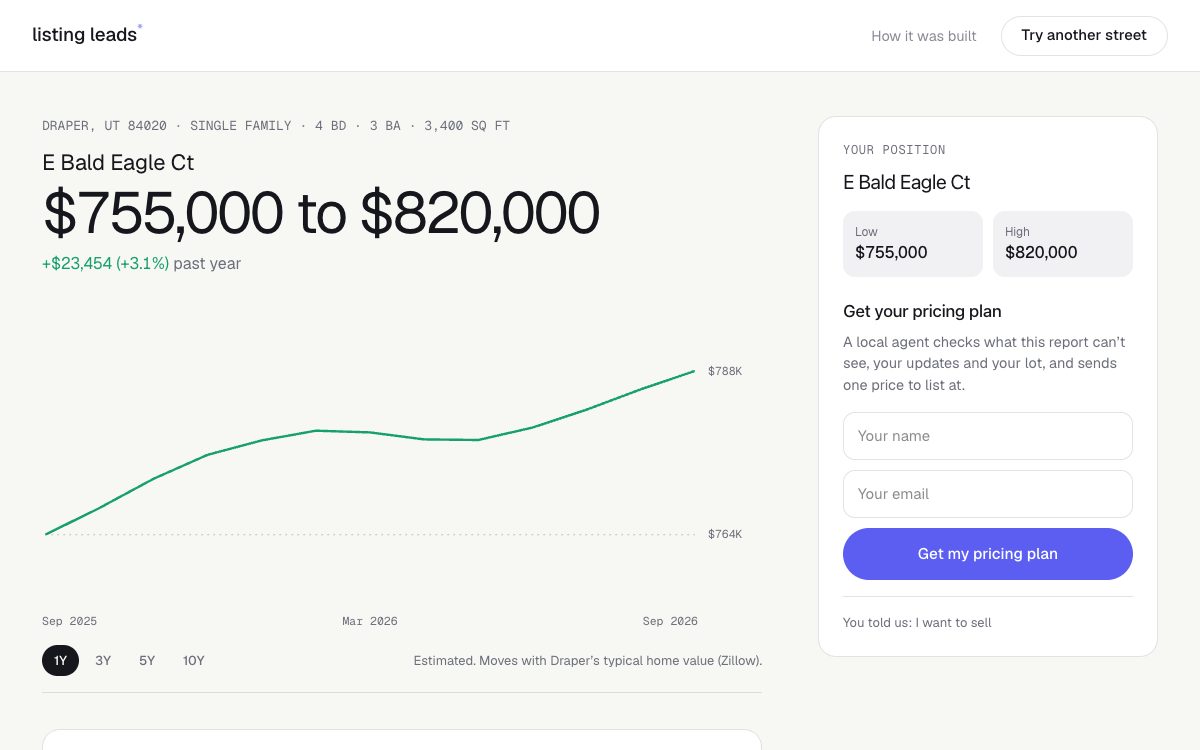
- On top, the home as the position: street, beds, baths, size, the value range in big numbers, and a value line with 1Y, 3Y, 5Y and 10Y buttons that moves with the town's typical value.
- A block for their answer: where to start the price if they want to sell, how much cash a lender might allow (many cap it at 80% of the value), or a box to type a cash offer and see it next to what a sale would leave after costs.
- Key numbers, then one plain insight line about homes like theirs, with the 3 or 4 numbers that prove it.
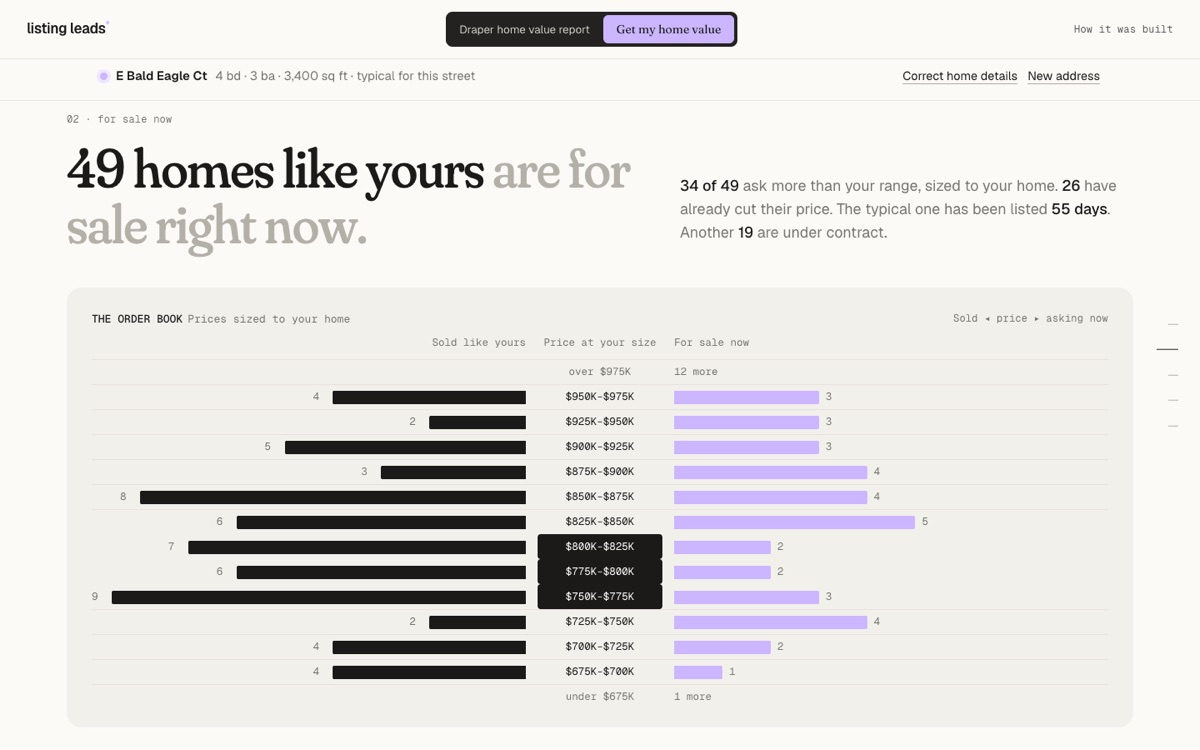
- Charts: price against days on the market (one dot per home), sold against asking prices at their size, sales by month, and a map of the sales.
- Four lists, green for good and red for bad: sold, listed but didn't sell, for sale and getting attention, for sale and sitting.
- One ask, on the side on a computer and right under their answer on a phone, with a bar at the bottom of the phone screen that jumps to it: "If I could get [three prices: a stretch 5% over the range, the top of the range, the middle] I would consider selling." Then name and email.

RULES
- Homes like theirs: same kind of home, within 30% of the size and 1 bedroom.
- Getting attention means under contract, or listed 14 days or less with no price cut. Sitting means on the market 60 days or more, or cut its price. Say so on the page.
- Only show a lesson the numbers support: at least 5 homes on each side and a gap of 5% or more. Never say "most" unless it is more than half.
- Street names only. No house numbers, owners or agents, in the text or in any photo.
- The report link carries the street and the answer, never a name or an email.
- Plain, short words. No em dashes.
How it got built.
Every version, the prompt I gave, and what changed. Newest at the bottom.
v1
Oct 29, 2026
A report from the spec
“Build the best home value page in real estate from this product spec: a value range, what the owner could walk away with, the sale price their goal needs, the sales behind it, and an agent offer tied to what the report cannot see.”@jimmymackin
An address, an optional question, then a full report with a payoff, a sale price, a goal and cost fields.
Two looks: a dashboard and a seller net sheet.
Cut: too many questions before the owner got anything back.
v2
Oct 29, 2026
One number for the whole town
“Open with a number nobody can ignore: every home in town at the typical value, and how much that grew in 10 years. Then ask one question: how much is your home worth? Tell the rest as a story, one chapter at a time.”@jimmymackin
The hook: Draper has $14,150,241,000 in real estate value, $6.82 billion more than 10 years ago.
One address box, and nothing else to fill in.
The town as a stock, with a 10-year chart.
v3
Oct 29, 2026
Three groups of homes, and the lessons
“Make it the most useful report an owner has ever seen: their value, the homes like theirs for sale now, the ones that did not sell, and the ones that sold, with what they did right. Only lessons the numbers prove.”@jimmymackin
An order book of sold prices against asking prices, sized to the owner’s home.
The homes that did not sell, and what they first asked.
The lesson: priced right, homes sold in 10 days; homes that cut later took 62.
Shipped to listingleads.com.
v4
Oct 30, 2026
One question, then a report like a stock page
“Put one qualifying question between asking for the report and the report, in a way that doesn’t feel like a gate: why do you want to know your home’s value? Then show a full-blown report that feels like a stock portfolio: the home and its value range on top, what is going on for homes like it, charts, and the homes that sold, didn’t sell, are getting attention and are sitting.”@jimmymackin
A Mercury style tour: the town number, the town as a stock, the report zooming in, the four parts.
One question, one tap, full screen: sell, take cash out, curious, or compare to a cash offer. It can be skipped.
The full report reads like a stock page: the home as the position with its value line, key numbers, the market insight, four charts and four lists.
The answer changes the report: where to start the price, the 80% cash-out limit, or a cash offer next to what a sale would leave.
One ask: Name your price. If I could get one of three prices, I would consider selling.
v5
Oct 30, 2026
Name your price, built for the phone
“The right column could be a Name Your Price: If I could get (show 3 prices) I would consider selling. I want this to be insanely good on mobile, and the address input bigger and more obvious.”@jimmymackin
Name your price: a stretch 5% over the range, the top of the range and the middle, one tap each, then name and email.
On a phone the card sits right under the answer, and a bar at the bottom jumps to it.
A solid, taller address box with a pin icon and a label.
Phone charts drawn for phones, and two-line list rows so nothing is cut off.
How we checked it.
50 automatic tests on the math and the data: the town number, the value range, homes like yours, the order book, every lesson rule, the four lists, the report link, the cash offer, the cash-out math and the three prices.
The report link carries the street and the answer, never a name or an email.
No street has a house number, and no owner or agent name is in the data.
A lesson only shows with 5 homes on each side and a gap of 5% or more.
As a logged-out visitor on a phone and a desktop: typed a Draper street, answered the question (and skipped it), read the full report, typed a cash offer and sent the form.