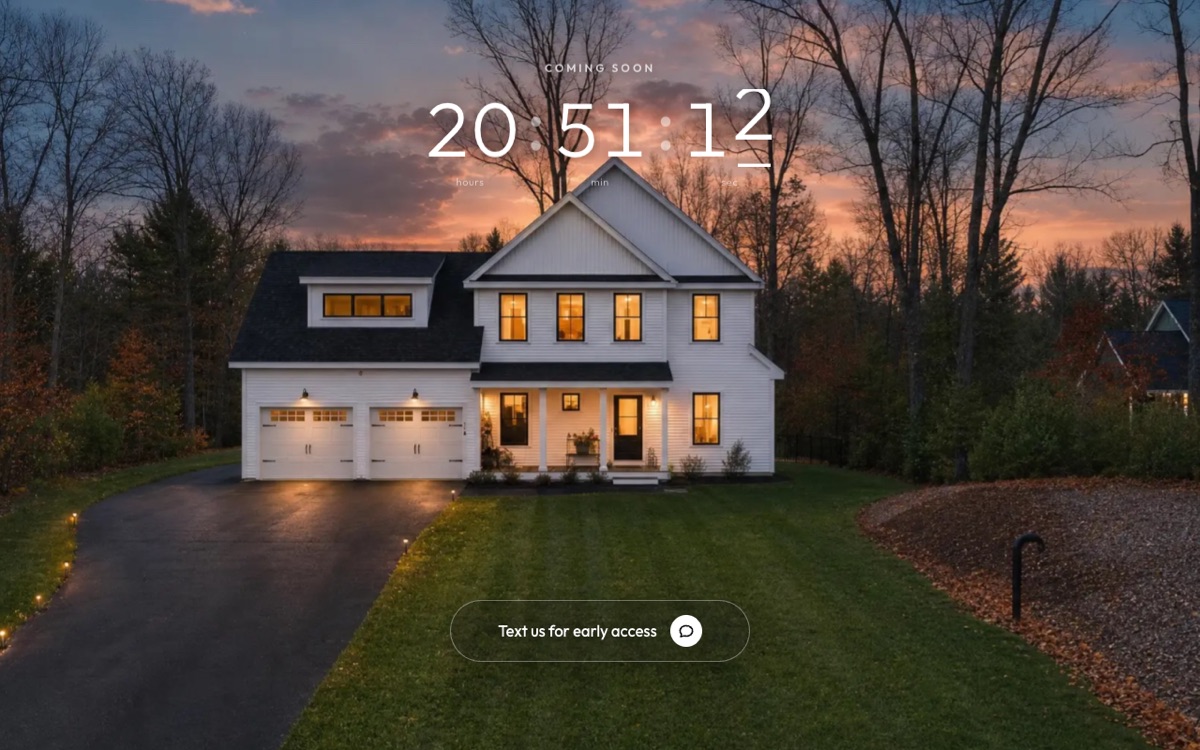
Copy this into Claude, fill in the blanks, and you get your own version. It is the same brief that built this one.
( The prompt )
You are a senior designer and front-end engineer. Build me a coming soon page for a home that is not listed yet. It has one job: get buyers to text me before it goes public.

THE HOME
- One great photo of the home at dusk: [your photo]
- My text line: [your number] and a keyword like DETAILS
- My brokerage name and license number for the footer

THE MOVE
- Open full screen on the photo. It drifts slowly, like it is breathing. A countdown sits at the top with a small "COMING SOON" label.
- The countdown is a rolling 24 hours that starts over on its own, so it never sits at zero.
- As you scroll, the photo pushes in and the scene dims to black. The countdown glides down above the headline.
- One white button, "Text us for early access", glides from the photo into its spot under the headline. The headline, the line and the keyword arrive one after another.
- Once the button lands, three typing dots show in a chat bubble, like someone is already writing back.
- The scroll should feel smooth and soft, like a spring, never jumpy.

THE ASK (only one on the page)
- Headline: "Want the price and photos before it's listed?"
- One line under it: "Text us. We'll send them a few days before it goes public."
- The button opens Messages with the text already written. No form. No email box.
- A small line under it: Or text "[keyword]" to [number].

RULES
- Phone first. The photo must load fast on a phone.
- Real photo only. Never show a price or a feature you do not have.
- Plain, short words. No em dashes.
- One HTML file I can open right away.
How it got built.
Every version, the prompt I gave, and what changed. Newest at the bottom.
v1
Sep 3, 2026
Drone footage and a countdown
“Build a coming soon page that makes people lean in. Drone footage that pushes in as you scroll, then fades to black and shows a countdown. Phone first. The price stays hidden until they sign up.”@jimmymackin
A drone clip as a smooth 60fps loop that pushes in as you scroll.
It fades to black, then shows a rolling countdown and a sign up form: phone, then email.
The price rolls down from $1.5M and lands when it opens.
v2
Sep 3, 2026
No form. One text.
“Kill the form. Nobody fills out a form for a house that is not listed yet. One tap opens a text that is already written. That is the whole ask.”@jimmymackin
The form and the code step are gone.
One white button opens a text that is already written.
An auto-responder answers the text right away.
No pop-up on top of the page.
v3
Sep 4, 2026
One photo, and everything glides
“Swap the video for one perfect dusk photo. It has to be fast on a phone. Try COMING SOON rising from behind the roofline, then let the countdown and the text button glide from the photo into the copy. Keep whichever is stronger.”@jimmymackin
One dusk photo that drifts slowly. The video is gone, so the page loads fast.
Tried COMING SOON rising letter by letter from behind the roof. Cut it: the countdown is the star.
The countdown and the “Text us for early access” button glide from the photo into the copy.
v4
Sep 4, 2026
Someone is typing
“Make the button feel alive. Once it lands, show typing dots in a real chat bubble, like someone is already writing back. And make the text ask how the page was built, so every lead starts a real conversation.”@jimmymackin
Three typing dots in a real speech bubble with a tail.
A faster scroll.
The text that opens now asks how this page was built.
v5
Sep 5, 2026
A countdown that never runs out
“The countdown can never hit zero and sit there. Make it a rolling 24 hours that starts over on its own, so the page always feels like it is about to drop.”@jimmymackin
A 24 hour countdown that loops and starts over at zero.
Live on listingleads.com.
How we checked it.
16 automatic tests on the logic: the scroll, the spring, the slow drift, the order things arrive in, the countdown and the text link.
The countdown counts to the same time every day and starts over at zero.
The text link fills in the message on both iPhone and Android.
Opened as a logged-out visitor on a phone and a desktop.